MyHumber Portal Redesign
Home / Projects / web / MyHumber Portal Redesign

MyHumber Portal Redesign

Design 2026

A UX/UI redesign proposal for Humber College's student portal, focusing on accessibility and modern design.

Overview

<div class="row g-5"><!-- Left Column: The Problem --> <div class="col-lg-6"> <h2 class="fw-bold text-white mb-4">The Challenge</h2> <p class="text-white-50 lead mb-5">The existing MyHumber portal suffered from severe inconsistency. A mix of conflicting fonts, colors, and navigational patterns made it difficult for students to find critical information like grades and schedules.</p> <div class="p-4 border border-danger border-opacity-25 bg-danger bg-opacity-10 rounded-4"> <h5 class="fw-bold text-white mb-3">Pain Points</h5> <ul class="list-unstyled text-white-50 mb-0 d-grid gap-2"> <li>Inconsistent Navigation</li> <li>Poor Mobile Responsiveness</li> <li>Outdated Visual Hierarchy</li> </ul> </div> </div> <!-- Right Column: The Strategy --> <div class="col-lg-6"> <h2 class="fw-bold text-white mb-4">The Solution</h2> <p class="text-white-50 mb-4">I developed a comprehensive <strong>Design System</strong> to unify the experience. By establishing a cohesive color palette and clear typographic scale, we transformed the portal into a modern, accessible hub.</p> <div class="row g-3"> <div class="col-12"> <div class="p-3 border border-secondary bg-dark rounded-3 d-flex align-items-center"> <div class="icon-square bg-primary bg-opacity-25 text-primary rounded-3 p-3 me-3">&nbsp;</div> <div> <h5 class="fw-bold text-white mb-1">Information Architecture</h5> <small class="text-white-50">Restructured navigation for intuitive access.</small></div> </div> </div> <div class="col-12"> <div class="p-3 border border-secondary bg-dark rounded-3 d-flex align-items-center"> <div class="icon-square bg-success bg-opacity-25 text-success rounded-3 p-3 me-3">&nbsp;</div> <div> <h5 class="fw-bold text-white mb-1">Mobile First</h5> <small class="text-white-50">Fully responsive design for on-the-go access.</small></div> </div> </div> </div> </div> </div> <hr class="my-5 border-secondary opacity-25"><!-- Before / After or Result Highlight --> <div class="row justify-content-center"> <div class="col-lg-10"> <div class="position-relative overflow-hidden rounded-4 border border-white border-opacity-10 shadow-lg group"><img class="w-100 h-100 object-fit-cover transition-transform duration-700 group-hover-scale" style="min-height: 400px; filter: brightness(0.7);" src="https://i.ibb.co/pWK4FXk/My-Humber-Website-Preview.png" alt="My Humber Redesign Preview"> <div class="position-absolute top-50 start-50 translate-middle text-center w-100 px-4"> <h2 class="fw-bold text-white mb-3 display-5">A Modern Student Experience</h2> <p class="text-white-75 lead mx-auto" style="max-width: 600px;">"The new design is more user-friendly and visually appealing. It empowers students to manage their academic life with confidence."</p> <div class="mt-4"><a class="btn btn-outline-light rounded-pill px-5 py-3 fw-bold backdrop-blur" href="https://xd.adobe.com/view/YOUR_LINK_HERE" target="_blank" rel="noopener"> View Interactive Project </a></div> </div> </div> </div> </div>

The Challenge

The existing MyHumber portal suffered from severe inconsistency. A mix of conflicting fonts, colors, and navigational patterns made it difficult for students to find critical information like grades and schedules.

Pain Points
  • Inconsistent Navigation
  • Poor Mobile Responsiveness
  • Outdated Visual Hierarchy

The Solution

I developed a comprehensive Design System to unify the experience. By establishing a cohesive color palette and clear typographic scale, we transformed the portal into a modern, accessible hub.

 
Information Architecture
Restructured navigation for intuitive access.
 
Mobile First
Fully responsive design for on-the-go access.

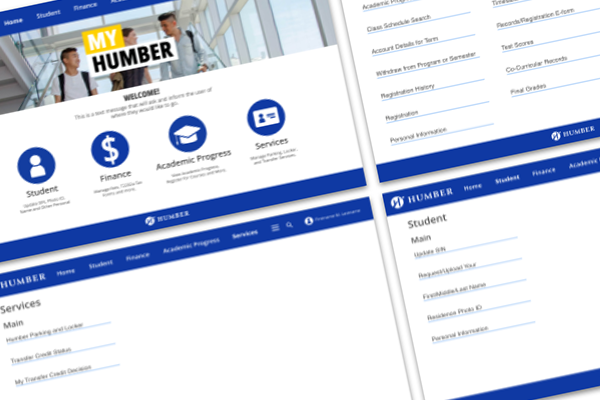
My Humber Redesign Preview

A Modern Student Experience

"The new design is more user-friendly and visually appealing. It empowers students to manage their academic life with confidence."

Design & Development Process

<div class="row g-5"><!-- Left Column: The Problem --> <div class="col-lg-6"> <h2 class="fw-bold text-white mb-4">The Challenge</h2> <p class="text-white-50 lead mb-5">The existing MyHumber portal suffered from severe inconsistency. A mix of conflicting fonts, colors, and navigational patterns made it difficult for students to find critical information like grades and schedules.</p> <div class="p-4 border border-danger border-opacity-25 bg-danger bg-opacity-10 rounded-4"> <h5 class="fw-bold text-white mb-3">Pain Points</h5> <ul class="list-unstyled text-white-50 mb-0 d-grid gap-2"> <li>Inconsistent Navigation</li> <li>Poor Mobile Responsiveness</li> <li>Outdated Visual Hierarchy</li> </ul> </div> </div> <!-- Right Column: The Strategy --> <div class="col-lg-6"> <h2 class="fw-bold text-white mb-4">The Solution</h2> <p class="text-white-50 mb-4">I developed a comprehensive <strong>Design System</strong> to unify the experience. By establishing a cohesive color palette and clear typographic scale, we transformed the portal into a modern, accessible hub.</p> <div class="row g-3"> <div class="col-12"> <div class="p-3 border border-secondary bg-dark rounded-3 d-flex align-items-center"> <div class="icon-square bg-primary bg-opacity-25 text-primary rounded-3 p-3 me-3">&nbsp;</div> <div> <h5 class="fw-bold text-white mb-1">Information Architecture</h5> <small class="text-white-50">Restructured navigation for intuitive access.</small></div> </div> </div> <div class="col-12"> <div class="p-3 border border-secondary bg-dark rounded-3 d-flex align-items-center"> <div class="icon-square bg-success bg-opacity-25 text-success rounded-3 p-3 me-3">&nbsp;</div> <div> <h5 class="fw-bold text-white mb-1">Mobile First</h5> <small class="text-white-50">Fully responsive design for on-the-go access.</small></div> </div> </div> </div> </div> </div> <hr class="my-5 border-secondary opacity-25"><!-- Before / After or Result Highlight --> <div class="row justify-content-center"> <div class="col-lg-10"> <div class="position-relative overflow-hidden rounded-4 border border-white border-opacity-10 shadow-lg group"><img class="w-100 h-100 object-fit-cover transition-transform duration-700 group-hover-scale" style="min-height: 400px; filter: brightness(0.7);" src="https://i.ibb.co/pWK4FXk/My-Humber-Website-Preview.png" alt="My Humber Redesign Preview"> <div class="position-absolute top-50 start-50 translate-middle text-center w-100 px-4"> <h2 class="fw-bold text-white mb-3 display-5">A Modern Student Experience</h2> <p class="text-white-75 lead mx-auto" style="max-width: 600px;">"The new design is more user-friendly and visually appealing. It empowers students to manage their academic life with confidence."</p> <div class="mt-4"><a class="btn btn-outline-light rounded-pill px-5 py-3 fw-bold backdrop-blur" href="https://xd.adobe.com/view/YOUR_LINK_HERE" target="_blank" rel="noopener"> View Interactive Project </a></div> </div> </div> </div> </div>

The Challenge

The existing MyHumber portal suffered from severe inconsistency. A mix of conflicting fonts, colors, and navigational patterns made it difficult for students to find critical information like grades and schedules.

Pain Points
  • Inconsistent Navigation
  • Poor Mobile Responsiveness
  • Outdated Visual Hierarchy

The Solution

I developed a comprehensive Design System to unify the experience. By establishing a cohesive color palette and clear typographic scale, we transformed the portal into a modern, accessible hub.

 
Information Architecture
Restructured navigation for intuitive access.
 
Mobile First
Fully responsive design for on-the-go access.

My Humber Redesign Preview

A Modern Student Experience

"The new design is more user-friendly and visually appealing. It empowers students to manage their academic life with confidence."

You Might Also Like